



When I first started experimenting with Stable Diffusion, my PC—equipped with a GTX 1060—had only 6GB of VRAM. Generating even a single 512×512 image would frequently cause my system to crash, let alone attempting to fine-tune models or generate high-resolution images. Build a new PC? Graphics cards like the RTX 4090 cost upwards of 20,000 to 30,000—and the price of a complete system is simply prohibitive.
Then, I discovered RunPod. It allows you to rent high-performance GPUs on demand. Whether you’re generating images, training models, or working on small-scale AI projects, it offers incredible convenience at a cost significantly lower than purchasing your own hardware. For a beginner like me, it was an absolute lifesaver. The very first time I used it, I was blown away by its “out-of-the-box” readiness.
What is RunPod?
Founded in 2020, RunPod aims to simplify AI training and inference. It maintains GPU clusters across numerous data centers worldwide—spanning the U.S., Europe, and Asia—and supports a wide range of graphics cards, from the RTX 4090 all the way up to the H100 and A100. According to official statistics, the platform currently serves over 500,000 developers; whether you are an individual enthusiast or a professional research team, you can find a solution perfectly tailored to your needs.
When I first logged into the platform, I was immediately captivated by its flexibility. You don’t need to install any hardware or worry about insufficient VRAM; you can run Stable Diffusion (SD) or Large Language Models (LLMs) directly in the cloud.
Three Product Options: No More Decision Paralysis
RunPod offers three distinct product types. While the options might seem a bit overwhelming at first glance, they are actually quite easy to understand. I, too, had to do a bit of exploring when I first started out. A “Pod” is essentially like renting your own dedicated computer in the cloud; it allows you to run models for extended periods, providing a stable environment for fine-tuning Stable Diffusion or training smaller models. I use Pods to generate Stable Diffusion images, and the process is incredibly fast—plus, I never have to worry about running out of VRAM and crashing again.
The “Serverless” option offers even greater flexibility. It allows you to invoke GPU resources on demand—paying only for exactly what you use—making it an ideal choice for setting up small-scale generative AI APIs or running occasional, one-off tasks. I once built a Stable Diffusion (SD) image generation API for a friend; whenever a request comes in, it automatically spins up a GPU to handle the task, releasing the resource once finished. This approach means you barely have to worry about wasting money.
There is also the “Community” feature—essentially a pool of idle GPUs owned by other users on the platform—which you can utilize at very low rates to practice your skills or test models. The first time I tried running a LoRA fine-tuning job on a Community card, I found it to be excellent for a beginner’s learning needs; although I occasionally had to wait in a queue, the affordability made it well worth it.
I believe beginners should start with either Community cards or entry-level “Pods.” Once you’ve gained some proficiency, you can then upgrade to higher-spec GPUs. This strategy not only saves money but also allows you to gradually familiarize yourself with the operational workflow.
Up and Running in Five Minutes
When I first used RunPod, I was mentally prepared for the possibility that I might have to spend half the day troubleshooting. However, the actual outcome was a complete surprise: the entire process took less than 10 minutes to complete.
It starts with registering an account and linking a payment method—steps that are standard for any cloud service and present no complex barriers to entry. What truly impressed me was the subsequent process of selecting a container image. The “Image Market” clearly displays ready-to-use environments—such as Stable Diffusion and PyTorch—allowing me to launch a fully configured workspace with just a single click, without needing to tweak any settings myself. It felt less like I was “setting up a development environment” and more like I was simply “turning on a pre-configured computer.”
Next came the GPU selection. I briefly hesitated between the “Pod,” “Serverless,” and “Community” options, but the interface provided clear descriptions of the ideal use cases for each, allowing me to quickly select the configuration best suited for my practice needs. Once launched, I was seamlessly transported into the cloud-based environment, with virtually no waiting time throughout the entire process.
The login method also came as a pleasant surprise. I initially assumed I would have to wrestle with SSH commands via the terminal, but it turned out I could access everything directly through a web-based UI—making it incredibly user-friendly for beginners. Upon logging in, I was greeted by a complete visual interface where I could directly input prompts or even simply drag-and-drop model files to start using them immediately, without the hassle of configuring file paths or environment variables.
When I entered my first prompt, I didn’t really have any high expectations. However, after clicking “Generate” and watching the progress bar slowly fill up, the distinct sensation that “a powerful cloud-based GPU is doing the heavy lifting for you” was truly palpable. A few minutes later, the images appeared, and I was momentarily stunned—the details, lighting, and clarity were vastly superior to anything my home-based RTX 3060 could produce; it felt almost as if I had switched to a machine in a completely different league.
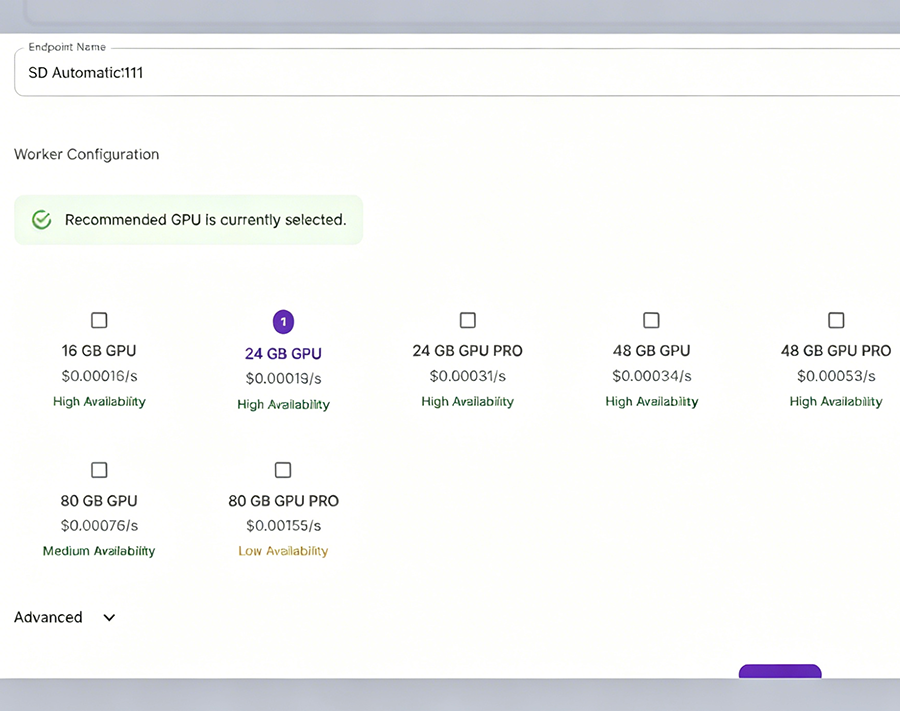
It was at that moment that I truly understood why so many people describe cloud GPUs as a shortcut for AI beginners: you don’t need to grasp complex configurations or be bottlenecked by your graphics card’s performance. As long as you know how to click a mouse and enter a prompt, you can dive straight into the creative process.
Who Is RunPod Best Suited For?
Simply put, if you are an SD creator looking to generate high-resolution images or produce work in batches; if you are an AI enthusiast wanting to practice fine-tuning models or set up a small-scale API; or if you are simply an individual looking to hone your skills without investing in an expensive graphics card—RunPod is an excellent fit for you. It saves you from making hefty hardware investments, allowing you to access high-performance GPUs at a low cost, while also sparing you the hassles of PC assembly, driver management, and the like.
With Cloud GPUs, the Barrier to Creation Has Truly Been Lowered
Since starting from scratch with RunPod, my biggest takeaway has been this: “low barrier to entry, low cost, and high speed.” A few dollars a day is enough to practice using “Community” GPUs; “Pods” offer stability for long-term operations; and the “Serverless” option allows you to run small projects at virtually zero cost. The container images and web UI are designed to be incredibly user-friendly, allowing even non-expert Linux users like myself to get up to speed in no time. Compared to buying your own GPU, this approach not only saves you money but also gives you the freedom to experiment with a wide variety of new models and techniques whenever you wish.


+ There are no comments
Add yours